Word Search Go: Word Puzzle
- 4.8
- Rating
- 100.00K
- Installs
- Free
- Price

 Analysis by App-foxy
I found Zen Word Search - Word Puzzle easy to understand from the first few minutes: look across a letter grid, spot the hidden words, and keep moving through a calm collection of word challenges. That simple idea makes it approachable, but the real question is how well it works for different people, places, and playing habits. After spending time with it, I see it as a gentle word game for short breaks rather than a deep puzzle system that will satisfy every kind of player.
It is a free word game from Gamonix Studios, available for players rated Everyone. The game has built a strong early audience, with over two thousand ratings averaging 4.8 and more than one hundred thousand installs. Those figures suggest that its straightforward format has connected with many casual players, although popularity alone does not tell you whether its presentation suits your own needs.
How the game reads and guides you
I focus here on how the game’s familiar word-search format keeps the rules easy to grasp while making the letter grid the real test. That distinction is useful before you decide whether its relaxed pace will suit you, because comfort depends less on learning what to do than on how easily you can scan and select words. Next, I look at how that plays out in ordinary sessions.
You May Also Like

 Blood Strike: 2.5 Anniversary
Blood Strike’s Loadouts Turn Every Drop Into a Tactical Gamble
A close look at Blood Strike’s custom loadouts: how fast access to signature weapons reshapes its battle royale rhythm, rewards preparation, and narrows the gap between fights.

 Pandora - Music & Podcasts
Pandora’s Music Is Easy to Start, but Harder to Recover
Pandora’s strength is its low-effort path from a seed to a station. Its weak spot is how much confidence it asks you to place in connection, setup, and quiet recovery.

 8 Ball Pool
 Is Built on Rivalries, Rematches, and Routine
A close look at the rivalries, rematches, shared routines, and unanswered safety questions that turn a quick pool match into a persistent mobile community.

 Samsung Music
’s Quiet Strength Is Playing What You Already Own
Its reach comes less from spectacle than from dependable access to a personal library. That simplicity is both the app’s strongest retention engine and its ceiling.

 AccuWeather: Weather Radar
AccuWeather Review: A Quick, Clear Forecast for Everyday Decisions
For everyday plans, the best forecast is the one you can understand quickly. AccuWeather makes rain timing, radar, and local conditions easy to act on, with a few trade-offs.

 Hill Climb Racing
Why Hill Climb Racing Still Turns Crashes Into One More Run
A tiny car, a bumpy hill and one more upgrade: Hill Climb Racing keeps resurfacing because its simple chaos makes every near-miss feel personal.
More From Our News Desk



A clean starting point for casual players
The strongest part of the experience is its basic readability. A word-search puzzle is familiar enough that I did not need a long tutorial or a complicated explanation before playing. The central task is visible immediately, and the surrounding interface does not ask me to learn a large collection of rules. That matters for anyone who prefers games that can be picked up without studying instructions first.
I also think this simplicity helps people who are returning to mobile games after a long break. There are no elaborate controls to remember, and the objective remains stable from one puzzle to the next. If you are introducing the game to a family member who is comfortable with words but not with fast-paced mobile games, this is a much softer starting point than a game built around timers, rapid taps, or several layered menus.
The calm word-search format also gives the game a different feel from daily word guessing games. In a guessing game, an incorrect attempt can feel like a failure that blocks progress. Here, I can scan, reconsider, and continue looking. That makes the experience more forgiving for players who need extra time to process a word or who simply want a quiet activity without pressure.
Where navigation feels less effortless
Simple gameplay does not automatically mean every part of the app is equally comfortable. Word searches depend heavily on the relationship between the word list and the letter grid. When the letters are dense or a target word is difficult to distinguish from nearby characters, the main challenge can shift from vocabulary to visual scanning. That may be enjoyable for some players, but frustrating for anyone who needs stronger separation between elements.
I recommend approaching each board methodically instead of sweeping randomly across the screen. I usually start with uncommon letters in the target word, then check likely directions from there. This reduces unnecessary movement and makes the game more manageable when several words share similar openings. It is a small change, but it turns the puzzle into a deliberate search rather than a tiring hunt.
Another useful habit is to pause after finding a word instead of immediately searching for the next one. I use that moment to recheck the remaining list and choose the word with the most distinctive letter pattern. This is especially helpful during a short session when concentration is limited. The game does not need to become a race; its format works better when I treat it as a visual exercise at my own pace.
Useful for different levels of word confidence
Because the activity is based on recognition rather than spelling words from nothing, it can suit players who enjoy language but do not want a demanding vocabulary test. I can recognize a familiar word in the grid even when I would not have thought of it as a clue independently. That makes the experience more welcoming than some crossword-style alternatives for casual players.
At the same time, players looking for a strong educational structure may find the experience limited. Finding a word does not necessarily teach its meaning, pronunciation, or usage. I would choose a dedicated vocabulary app for language study and use this game as a lighter way to practice attention and word recognition. That distinction is important for parents, learners, or anyone expecting measurable language instruction from the title.
Reading comfort depends on the session
For a quick break, the amount of reading feels reasonable. I am not asked to absorb long explanations before reaching the puzzle, and the core interaction is visually direct. That makes it suitable for a bus ride, a waiting room, or a few quiet minutes before bed, provided the surrounding conditions allow me to see the grid clearly.
Longer sessions are different. Repeatedly scanning small groups of letters can become tiring, particularly for players who already experience eye strain when reading on a phone. I would not treat the game as automatically comfortable simply because the rules are simple. A larger screen, good lighting, and regular pauses make a noticeable difference to the experience.
Motor and sensory considerations
The game’s main physical demand is controlled movement across the letter grid. That is less intense than tapping rapidly or coordinating several buttons, which gives it an advantage for players who prefer slower interactions. I can take my time deciding where a word begins and ends, and the basic action does not require the reflexes expected by arcade or action games.
Still, a word search is not entirely free of motor demands. Selecting a word requires accuracy, and a player with limited fine-motor control may find narrow letter spaces difficult to use consistently. The challenge is not speed; it is placing a finger or gesture along the intended path without crossing into a neighboring word. Anyone who finds precise touchscreen gestures uncomfortable should test a short session before committing to longer play.
One practical approach is to hold the device steadily with both hands and use the finger that gives the most direct reach across the grid. I find that this is more reliable than playing one-handed while walking or carrying something. It also reduces accidental movements, which is useful when the puzzle requires a line to pass through several letters in sequence.
Visual processing is likely to be the more important consideration. Players with reduced contrast sensitivity, color-vision differences, or difficulty distinguishing tightly packed characters may need more effort than the average user. I cannot responsibly describe the game as having specialized accessibility support, so I would judge it by your own screen, display settings, and comfort rather than assuming that a calm design works equally well for every visual need.
If you use a phone with adjustable text or display settings, it is worth experimenting before a long session. Larger system text may not change the puzzle grid itself, but display brightness, contrast, and screen size can still affect how quickly the letters separate in your vision. I would also avoid playing in glare; reflected light can make similar characters blend together and turn an otherwise relaxing puzzle into unnecessary work.
Sound, attention, and sensory load
The appeal of this game is that its core activity does not demand constant audio attention. I can focus on the letters without needing to follow spoken instructions or react to a sound cue. That makes it a reasonable option when I want a quiet activity, although the overall comfort of any mobile game still depends on the device, the environment, and the way its interface presents feedback.
For people who are sensitive to interruptions, the best use is a controlled one: start a puzzle when you have a few uninterrupted minutes, keep the phone at a comfortable brightness, and stop when the search begins to feel visually repetitive. The game’s relaxed identity can encourage longer sessions than intended, but relaxing does not mean limitless. Short, intentional play is easier on attention than trying to clear puzzle after puzzle without a break.
Situational access in everyday life
I see the game working particularly well in situations where I want something more engaging than scrolling but less demanding than a full game. During a short wait, I can open it, solve part of a puzzle, and return later without needing to remember a complex story or control system. That makes it practical for fragmented free time.
It can also suit shared household use. One person can search while another suggests possible words, creating a cooperative moment without requiring both people to understand a complicated ruleset. That said, the small grid may be less comfortable to share on a phone than on a larger display, and two people looking from different angles may not see the letters equally well.
For older players, the gentle pace and familiar word-search concept may be more inviting than modern games built around speed or competition. I would still make the decision based on visual comfort and touch accuracy. Familiarity with paper word searches helps, but a phone screen introduces its own issues, especially when the grid is compact or the device is being held at an awkward angle.
It is also a sensible choice for players who want a game that can be played without committing to a long narrative. I do not need to remember characters, objectives, or a previous plot point. If I have only a few minutes, the puzzle itself is enough. In contrast, someone who wants a strong sense of progression, dramatic variety, or a large strategic system may quickly feel that the format is too narrow.
Free access and the cost of continuing
The game is free to download, which makes it easy to try without making an immediate purchase. It includes in-app items priced from under a dollar to around twenty-five dollars each, so I would pay attention to the purchase flow and decide in advance whether I want to spend anything. The free entry point is useful for testing readability, touch comfort, and general enjoyment before considering optional spending.
My advice is not to treat optional purchases as a solution to every moment of frustration. If a puzzle feels difficult because the letters are visually tiring, spending money may not address the real problem. First adjust your surroundings, take a break, or try a more systematic search pattern. Purchases make sense only if they provide something you genuinely value and fit your personal budget.
This pricing model also affects who should choose the game. A player who wants a completely predictable, one-time-cost experience may prefer a paid word puzzle with no purchase prompts. Someone comfortable with trying a free game and deciding later may find the arrangement reasonable. The important trade-off is that free access lowers the barrier to entry, while optional items can make the overall experience less appealing to people who want a single fixed price.
Remaining barriers that affect inclusion
The biggest barrier is the possibility of visual fatigue. Word searches look simple, but they ask the eyes to compare many similar characters repeatedly. Players with reading difficulties may enjoy the familiar vocabulary while still struggling with the grid. I would not assume that a player’s ability to read a word list guarantees that the search area will be equally accessible.
A second barrier is the precision of the touch interaction. The game is slower than an action title, but a slow gesture can still be inaccurate if the target spaces are close together. This may affect people with tremors, reduced dexterity, or difficulty maintaining a straight movement. A stable surface and two-handed grip can help, but they cannot remove every limitation of a small touchscreen.
A third issue is environmental dependence. Glare, dim lighting, a crowded commute, or a constantly moving vehicle can all make scanning harder. The game is best when I can hold the phone steadily and give the grid my attention. If you need a title that remains comfortable while walking, multitasking, or reacting to frequent interruptions, this is probably not the right fit.
There is also a cognitive trade-off. The lack of complex rules is welcoming, but repeated searches can become monotonous for players who need changing mechanics to stay engaged. I would recommend it to someone who finds repetition soothing, not to someone who measures value by constant novelty. A richer puzzle collection or a word game with clues and strategy may be a better alternative when variety is the priority.
How it compares with familiar alternatives
Compared with crossword games, this title asks less of the player’s recall and clue-solving ability. I do not have to produce an answer from a definition; I have to locate a visible sequence. That makes it more approachable when I am mentally tired, but less satisfying when I want to stretch my knowledge or reason through layered clues.
Compared with daily word-guessing games, it is less dependent on a single attempt structure. I can keep searching instead of being limited by a small set of guesses. This is better for relaxed play and for people who dislike the pressure of getting a word right quickly. On the other hand, daily guessing games often provide a stronger ritual and a clearer sense of achievement, so players who enjoy a compact challenge with a defined finish may prefer them.
Compared with competitive word games, this one is the quieter option. There is no need for me to race another player or compare every move. That makes it more suitable for private downtime, but it also means I would not choose it when I want social competition, strategic interaction, or a strong multiplayer atmosphere.
Compared with paper word-search books, the phone version is more portable and easier to start immediately. Paper may still be better for people who dislike screens, prefer a larger page, or want to avoid touchscreen precision. The choice comes down to convenience versus physical reading comfort, not simply to which format is more modern.
Who should try it, and who should skip it
I would recommend this game to casual players who enjoy hidden-word puzzles, people looking for a quiet way to fill short gaps in the day, and families wanting a simple activity that does not require quick reflexes. It is also a good candidate for anyone who likes familiar rules and would rather spend time searching than learning a complicated system.
I would be more cautious about recommending it to players with significant visual strain, limited touchscreen precision, or a strong need for adjustable presentation. I would also point elsewhere if your goal is structured vocabulary learning, competitive play, a one-time purchase with no optional items, or constant mechanical variety. Those are not flaws in the concept; they are signs that the game serves a particular kind of player.
My inclusive verdict
Zen Word Search - Word Puzzle succeeds because it keeps its central idea approachable. I can open it for a short break, understand what to do quickly, and search at a calmer pace than most action-oriented mobile games. Its word-focused format is familiar, its free entry makes experimentation easy, and its Everyone rating makes it suitable for a broad audience in principle.
My recommendation comes with a practical condition: judge the grid, not just the rules. The experience is inclusive in its simplicity, but the letters, spacing, touch accuracy, and screen conditions will determine whether it is genuinely comfortable for you. Try a brief session in the place where you expect to play, use a steady grip, and stop when your eyes or attention begin to tire.
With that expectation, I think Gamonix Studios has made a pleasant choice for relaxed word searching rather than an all-purpose puzzle platform. The current version is 3.0.102, and the game runs on Android 7.0 or later, which keeps it within reach of many older devices. I would choose it for quiet, low-pressure word practice and recommend a different option when accessibility controls, deep learning features, competition, or guaranteed visual comfort matter more than simplicity.
FAQs for Word Search Go: Word Puzzle
01What is Zen Word Search - Word Puzzle?
Zen Word Search - Word Puzzle is a mobile app designed to offer a relaxing and engaging word puzzle experience. With a calming interface and various themed word search puzzles, it aims to provide users with a stress-free way to sharpen their vocabulary and cognitive skills. The game is available for both Android and iOS devices.
02How does the gameplay of Zen Word Search work?
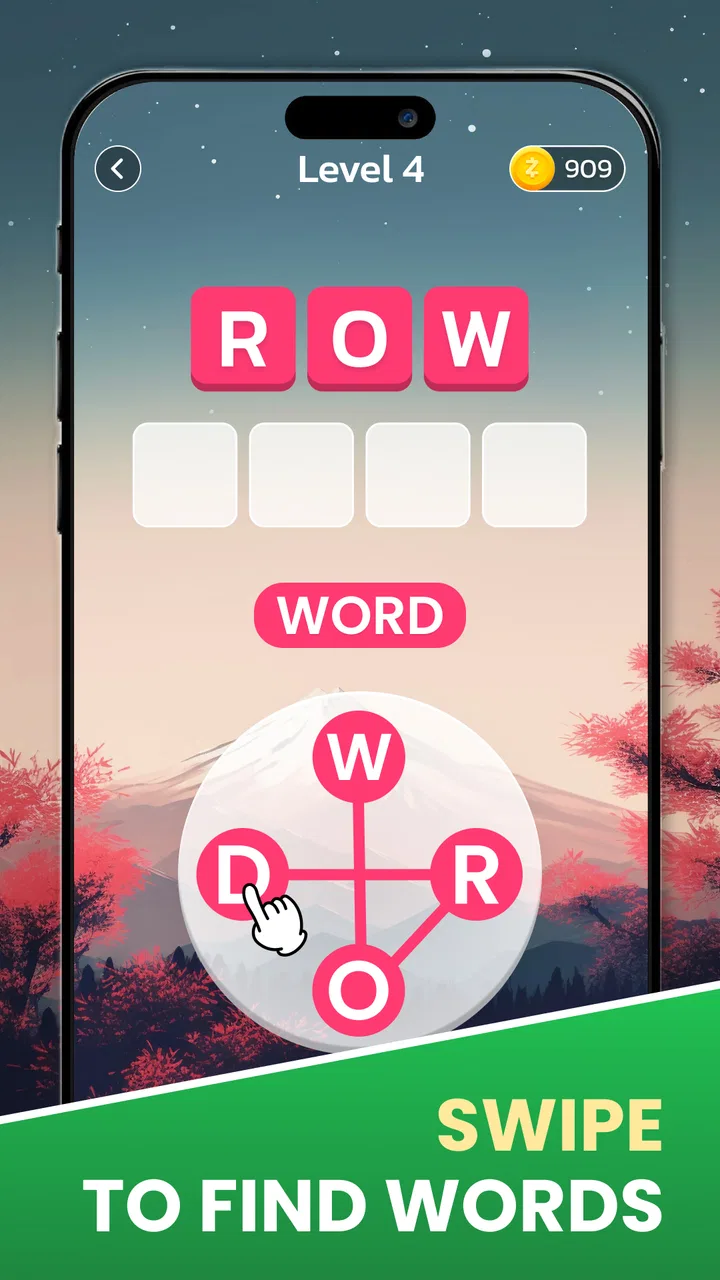
The gameplay involves finding hidden words in a grid of letters. Players are presented with a list of words to locate, and they must swipe across the letters to highlight and identify them. The game offers various difficulty levels and themes, ensuring that users can enjoy a tailored experience regardless of their skill level.
03Are there any in-app purchases in Zen Word Search?
Yes, Zen Word Search offers optional in-app purchases. While the basic version of the game is free to download and play, users can purchase additional puzzle packs, hints, or ad-free experiences. These purchases enhance the gameplay but are not necessary to enjoy the core features of the app.
04Does Zen Word Search require an internet connection?
Zen Word Search can be played offline, making it a great option for users who want a distraction-free experience or need to play in areas without internet access. However, an internet connection is required for downloading additional puzzle packs and receiving updates.
05Is Zen Word Search suitable for all ages?
Zen Word Search is designed to be family-friendly and is suitable for all ages. It provides an educational and entertaining experience, making it a great tool for children to improve their vocabulary while offering adults a relaxing and stimulating puzzle-solving activity. The app's simple interface ensures accessibility for all users.
Pros
- Engaging and addictive gameplay.
- Wide variety of puzzles.
- Offline play available.
- Simple and intuitive interface.
- Regular updates with new levels.
Cons
- Contains in-app purchases.
- Occasional ads may disrupt gameplay.
- Limited hints available.
- Some puzzles are quite challenging.
- No multiplayer mode.

Word Search Go: Word Puzzle
Gallery